If you have never heard dbx-Encoded LP Records, you are Missing Out!

 November 15, 2022

#458

Gentle reader,

If you are of an age from when there was no "digital" anything. Then you listened to LP records and analog tapes, if you had a tape deck or reek-to-reel tape deck, that is.

The problem with analog tape recording is tape "hiss". Dolby Labs became the preeminent provider of tape noise reduction for both the music and film industry but for home use also. Countless millions of cassette tape decks have various types of Dolby noise reduction built right in.

But, there was a newcomer to this field of endeavor, and they called themselves "dbx".

They took it one step further and invented a way to greatly improve the way LP records sounded. 

Look at the black strip across the top of these LP covers. "Super Disk" was an early form of Audiophile records. How successful they were, I do not know. The right LP is the only one I have. I DO have Audiophile LP records, and they do sound better to me. 

But, dbx created an entirely different way to make TRULY better sounding records. They have ZERO surface noise, no tape hiss and much greater dynamic range than even the best audiophile or direct-to-disc record can produce. To find out more, here is a link to the Wikipedia page on dbx: dbx (noise reduction) - Wikipedia 

I first came across a dbx "box" which is an encoder for making your audio tapes which you are recording sound better and lose the hiss. And a decoder for both dbx encoded tapes AND dbx encoded records. Here is what I found:

As you can see, it is pretty simple, control-wise. Once I had that, I began the search for dbx encoded records. 

eBay has some, a small fraction of all the records that are for sale on the site. Discogs is a better choice, most sellers are just trying to get rid of records, they don't care (or so it seems based upon price) if there is a dbx sticker on it. But, the eBay sellers KNOW what they have and will try and get as much as they can for their dbx LPs.

Here is the back of the NX-40 box. Well marked, I see now that is is a TYPE II dbx box as is the one I use now.


These are just three of the fifteen Classical LPs I have found which are dbx Encoded. They were very inexpensive via Discogs.

I already showed you these two. It is the first Classic Rock record I have found and bought that is dbx Encoded. 

So, it was with much anticipation that I sat down to listen to it. Firstly, I had to immediately turn down the volume, because day-am!, it was loud. Then, my mind was immediately blown by JUST how amazing it sounded! I cannot emphasize this enough, dbx WORKS!


If you click or tap on these (or any) pictures, you can read all the nitty-gritty they had provided to the listener.

Note, that I now have THREE different versions of this Aaron Copland album. It is from 1967 and the Dallas Symphony Orchestra from that era was renowned for excellent renditions AND excellent sounding recordings. More on these three below.
I spied this SEALED record on eBay and since I already had an Audiophile record of it as well as the standard LP, I bought it.


Back in those days, they included a lot of information, especially on Classical records about what you bought. Sometimes, they were on the paper sleeve that held the record, thus called "liner notes" or, in this case on the back of the cover.

Aside from the dbx information sheet within the cover was this card. I just looked up the address and it's not much of a building and there is no business name on it.
You can see the dbx II model 122 box I am using now. It is the second one I have bought. The first one had some kind of fault on one channel while decoding LP records, and no amount of contact cleaning helped. But, this one works superbly.
Here is the back of it, note the three different kinds/brands of cables I have attached.

I have written other articles on dbx encoded records, but with the new-to-me box and the two new records, I just could not keep it to myself, I had to share.
Sadly, other than making a video and adding it to this article, there is NO way to truly show you JUST how incredible dbx encoded records sound. 
Analogue Productions produced this reissue LP. Sadly, they only did side one of the Copland LP and put some Charles Ives music on side two.
I always thought it sounded fantastic. Until, I played the new dbx record. Now, it's "Meh".
Ooh! "Limited Edition"! It is, but it has lost it's appeal to me. That IS the problem we music lovers (and those like me that like to get the best sound they can afford) have in that when we do hear something mind blowing, we want EVERYTHING to sound that good!
Here is the system I have accumulated after more than forty years of buying and trying hundreds of components and countless speakers.
The heart of the system is 1990's Panor-era Dynaco components. Right to Left is a PAT-6 preamplifier/tuner, a QD-2 passive surround sound device and a ST-200 power amplifier.
Everything was turned on for the picture. Small monitor is attached to the OPPO DV-980H universal disc player. Some DVD-Audio discs require making choices before playing. Beneath the OPPO is a TDK CD Recorder. To the right of them is my Nakamichi CD changer. Below that is a JVC three-head cassette tape deck. 
On top is a vintage Realistic APM-300 audio power meter. On top of that is a speaker switch which I use to switch the meter from A to B speakers. The power amp actually switches the speakers. Turntable is an Audio-Technica fully manual unit with Ortofon Red cartridge. 
Above, a fisheye view of the listening room. Some of the music collection is seen, but only some.
Of the MANY speakers I have tried over the decades, those Cerwin-Vega! LS-12 units are the BEST sounding of any. Bar none. Inside of them are the only vintage Dynaco pieces I still own. They are A25XL models. The black tower speakers in the foreground of the fisheye picture are Tannoy C88 models. They used to sit where the Dynaco speakers do, but I felt that I was doing the Dynacos an injustice by only using them for rear/surround speakers.

The record shelf was a great thrift store find. It is two pieces which bolt together. The one thing I don't like about them is the side panels are at least ten inches deeper than the back. So, if there were a way to remove that excess WITHOUT harming the shelf, I would do so. But there is not. So, it sits a littler further into the room.

Anyway, thank you SO much for taking the time to read this article on dbx encoded LP records and some of the equipment required to listen to them. Oh, if you buy one and think, "I don't need a dbx box." You will be sorely disappointed. 

Scott Robb
November 15, 2022
#458

Feel free to leave a comment below or on Facebook. Your kind words are of such power to keep me writing.

Review of Windows 11 HP Pavilion Desktop PC Model TP01-2040 AMD RYZEN 5000 plus ROOFULL External DVD-Rom Drive Review.

 November 08, 2022

#457

Gentle readers,

In my last article, I showed you the two 27 inch HD monitors I bought and how they were physically configured "stacked" on a two-arm monitor stand. It can be read here:

The Robb Collections: Comparing 27 Inch HD Computer Monitors LG 27MK600M-B verses HP M27ha FHD. Plus a Look at HUANUO Dual Gas Spring Monitor Mount.

NOTE: I am a retired subway car technician and have NO connection with ANY company! I am writing this revue for your information.

I finally decided to go ahead and get a new desktop personal computer because the HP model I had been using since it came out with Windows 7 (I upgraded it to Windows 10) was just not up to the demands the Internet can put on an old-timer like it.

In the past, all but one desktop (and laptop) Windows computer have been purchased as "Refurbished". Which means they belonged originally to a company or even the government and were returned to the manufacturer when new models came out. Said companies then sold them to other companies which refurbish computers. The one new desktop PC was an E-Series (I think) brand and it was not much to write home about. LONG ago, I built a tower computer with a Cyrix 586 processor. I loaded it with Windows 95. Our first PC was a used 286(!).

All that being said, I went on "The Jungle Site" and looked for a HP brand PC with Windows 11 and an AMD processor. I prefer AMD over the best known brand because I like to be different. For example, I drive seventeen-year-old Volvo wagon which has a turbocharged FIVE cylinder engine and a six-speed MANUAL transmission.

The aforementioned desktop personal computer and ROOFULL DVD-ROM external drive. Note the AMD RYZEN badge on the front of the computer.

This is the sticker which is on the side of the PC. At first, I began to peel it off, then thought better of it and left it there. Might need that information someday.

The new meets the old. Not only is the new one smaller, it is MUCH lighter than the one I have been using for years.

The new PC came with a generic Chinese-made keyboard and mouse. I use a Microsoft ergonomically designed keyboard and Logitech Trackball Mouse. Both perform far better than the generic items and feel better too.

There were a few other things I bought to ease my transition from old PC to new one: An HP 960GB internal drive, a Plugable USB transfer cable and the aforementioned external DVD-Rom drive. How sad that some small Chinese technology company was able to make an optical drive which WORKS with Windows 10 and 11 while Microsoft just ignores the problem that those two operating systems cannot work with them.

Aside from the smaller size and weight, it is the first vertical PC I have seen with the power supply on the bottom. 

Although the PC's front panel is able to accept an optical drive, none was included, because, well, you know. There are FOUR slots in the back panel for adding separate PC boards, but only one PCI slot on the motherboard inside.


Initially, I only plugged in what you see here: Power cable, HDMI and audio cable for the HP monitor and keyboard and mouse USB cables. What is on top of the PC case was a ROKU. I have since removed it and took it back to the living room TV.

Interesting to me is that the PC was custom built for me. Well, at least through Amazon, perhaps all are made to order. It was built on October 22, 2022.
Not seen in these photos are the bracket which will hold the "D" drive and the cover which sits above it.
The Mother board is one of the smallest I have seen. But, with miniaturization, it is not surprising. 
As previously noted, there is exactly ONE slot for a separate (and better) Video card to be installed. I'll have to see if I want to install one later on.
The largest processor fan that I have seen. My old HP PC has extensive ducting and variable speed fan for it's processor. A case fan is a nice touch and it it was not there, I would have added one.
This blue thing IS the solid state drive for the computer.
Above and below is the brand new HP 960GB D-Drive I bought (separately) and installed. It is for backing up the computer and for storage. You can see the bracket/shelf for it.
Below, the black metal piece which partially covers the D Drive. IF it were possible to install an optical (DVD-ROM/CD-ROM) drive, it would sit right where the HP drive is, but turned 90 degrees.
So, that is the "guts" of the new computer. The PC recognized the new drive, but Windows (Surprise!) did not. Even an HP tech had no idea how to get it to work. I eventually remembered the steps to do so, but, being 66-years-old, I have already forgotten how I did it!

I "did my own research", which meant looking for reviews of Windows 11 compatible DVD-ROM/CD-ROM drives. I chose the top rated one which is shown below.

NOTE: I will provide links to Amazon for all the items mentioned in the article so that you can learn more.


They thoughtfully included three USB (and one USB-C) port along with a SD memory card slot. I have not tried them out, as the PC has plenty of USB-3 ports and it's own SD slot on the front.
I decided to leave it plugged into the front of the computer rather that have to get it out of the closet every time I need it. 
And, to show that it DOES work (I used it to install Photoshop Elements 12, Word Perfect, Printer and other software programs) and was trying a CD-ROM disc to see if it worked for those. It does. Click (or tap) on this photo and enlarge it and on the left side, you can see the drive listed.

REVIEW! Yes, all that I wrote was just the preface! 

First, this Windows 11 HP PC. It has worked flawlessly, it loads at startup incredibly quickly. Other than finding where things are in Windows 11, I have been able to get used to it easily. It is equipped with Wi-Fi and it works perfectly with no problems.

I use AVAST ONE Internet protection/PC monitoring/improving software. I also use their own "Secure Browser" which is based upon Chrome. Plus, I use Duck-Duck-Go for a search engine. They do not track your searches. As mentioned, I use Word Perfect and it's associated programs rather than Microsoft's 365. I refuse to have pay an annual fee to use their products. Plus, I have been using Word Perfect and Quattro Pro since the 1990's without problems.

Unlike my old PC, it plays YouTube and other videos without hiccups and has good audio (remember that was why I had to buy an HP monitor?) as well. Websites load instantly. New tabs as well. Absolutely ZERO evidence of the processor slowing down.

I cannot comment on the various Microsoft programs installed on the computer, since I deleted them, but they are all there just waiting for a new user to enjoy, should you purchase one.

The company which makes Windows 7 Microsoft games work on Windows 10 PCs has also broken the code and made it work for Windows 11. All I play is solitaire and mahjong. 

Once I had gotten the D Drive to work in this computer, I was able to hook up the PLUGABLE two-way USB-2 cable to both PCs. It's software transfers needed files automatically and lets one choose what they want to transfer from old to new and choose each source file and new location/drive in the new computer. It worked perfectly and I was able to transfer everything from old PC to new PC in a matter of an hour or two.

As promised, here are the items I purchased to make my life easier, all were purchased from Amazon. Again, I AM NOT ASSOCIATED with Amazon or ANY of the companies which made these products.

Amazon.com: HP Pavilion Desktop PC, AMD Ryzen 5 5600G, 12 GB RAM, 512 GB SSD, Windows 11 Home, Wi-Fi 5 & Bluetooth Connectivity, 9 USB Ports, Wired Keyboard and Mouse Combo, Pre-Built PC Tower (TP01-2040, 2022) : Everything Else

Amazon.com: HP S650 960GB 2.5 Inch SATA III PC SSD Internal Solid State Hard Drive - 6 Gb/s, 3D NAND TLC, Up to 560 MB/s for Laptop and Desktop Updating - 345N0AA#ABA : Electronics

Amazon.com: ROOFULL External CD DVD Drive USB 3.0 Type-C 7 in 1 Portable CD ROM DVD+/-RW Optical Drive Burner with USB Ports & SD/TF Card Slot for Mac MacBook Pro/Air, iMac, Windows 11/10/8/7 Laptop Desktop PC : Electronics

Amazon.com: Plugable USB 2.0 Transfer Cable, Unlimited Use, Transfer Data Between 2 Windows PC's, Compatible with Windows 11, 10, 7, XP, Bravura Easy Computer Sync Software Included : Electronics

So, there you go, a look at my new desktop PC. I am very happy with it. 

NOTE: I have decades of experience working on electronics and computers. DO NOT TRY opening up a computer or anything else which uses electricity! Doing so could end very badly for you. Electricity is NOT to be messed with! You have been warned!

With that final warning, thank you for taking the time to read my review of these items. All have worked well for me, and should you decide to buy and try them, they should work well for you too.

Scott Robb

November 08, 2022

#457

Comparing 27 Inch HD Computer Monitors LG 27MK600M-B verses HP M27ha FHD. Plus a Look at HUANUO Dual Gas Spring Monitor Mount.

October 27, 2022

#456

Gentle reader, 

I have never been one to "have to have" the latest and greatest of anything. The number of new cars I have bought in almost fifty years of driving is two. OK, we have bought some new ones for Nancy to drive, but they are for her. In fact, my car is a 2005 model and I am still in love with it. In the case of Volvos here in North America, they really do NOT make them like they used to. But, I have gone off on a tangent.

The Windows PC computer I have been using for several years, I bought "Refurbished" and I did a fresh install of Windows 10 on it. I installed a good video card, a Solid State Drive and other things to keep it going, and generally, it works fine. 

However, Facebook has done SOMETHING which causes it (and my much newer, but still several years old Laptop) to slow w-a-y down. And it just decides to crash (Facebook does, not my PC) sometimes. 

All that being said, I decided to bite the bullet and actually buy a NEW Windows 11 PC! I like HP products and AMD processors. "The Jungle Site" as a favorite YouTuber of mine refers to a certain all-conquering website, has a good deal on HP PCs and they suggested getting a new 27 inch monitor while I was at it. 

What I did not notice until the monitor arrived is that it is an LG product. "No problem," I thought, "LG makes good things." We have two LG TVs and an LG clothes dryer. All work great.

The problem is, the LG 27MK600M-B monitor does NOT have built-in speakers. WTH? In 2022? It does have TWO HDMI inputs which is nice and VESA 100mm screw mount holes, which makes it stand mountable. 

The new PC is not due to arrive for a couple weeks from now, no explanation from Amazon as to why. I have a pair of old computers speakers. So, I decided to find a PCI soundcard for my old HP. I found a NIB one via eBay. Installed it and tried to install the drivers. 

Then this happened. You may be aware that Windows 10 has a problem with optical drives. It does not play well with them. Microsoft is SILENT about this little problem. "No problem, I'll download the drivers." NAH, that didn't work either! Seems like all the sites no longer have those drivers available! GRR!

Back onto the jungle site I went looking for a 27 inch HP monitor with built-in speakers. I found it in their M27ha FHD model and it was cheaper to buy than the LG was. 

Since I'd been using the LG and aside from no sound, it is a good monitor, albeit a little weird, which I will get into later, and I had recycled the box, I couldn't return it.

Now, to figure out how to utilize two 27 inch monitors (which are each 25 inches wide) on my little desk, since side-by-side will not work.

Vertically is the answer! The HP monitor arrived quickly, and I had already done my research and ordered a Chinese-made HUANOU Dual Gas Spring Monitor Mount. I know about gas filled things and how they work, so the idea of this device intrigued me.
I have been mechanically inclined all my life and spent 44 years working on complex vehicles, so assembling the beast was not difficult at all. The instructions are clear with excellent illustrations and even a troubleshooting page, just in case. So, kudos to the fine people of HUANUO way on the other side of the world.
It's designed to be used either vertically or side-by-side. This model works on monitors up to 27 inches and it was perfect.

Since the HP monitor has built-in audio, it is my main monitor and for the LG I found a good use for it aside from future PC use: ROKU. I have little ROKU device which has audio output and I rarely use it since I can't see the TV in this room from where I sit using the PC.

I removed it from atop the TV and put it on top of my old PC with the HDMI cable from it going into LG's #2 HDMI input on the upper monitor. The ROKU's audio output goes into the stack of vintage YAMAHA stereo components next to me. I've already tried it and it all works fine.

Now, some closer shots of the HUANOU Dual Gas Spring Monitor Mount. Please look carefully at the back of both monitors. Remember, this article is about comparing them. Hopefully, someone will find out things about computer monitors they did not already know and become an educated consumer.

HUANOU engineers seemed to have thought of everything. The two devices on the base of the shaft of the stand can be placed where you want them. They work fine as you see them. See that funny looking thing the cables are going through right at the bottom of the photo? Another clever HUANOU device. It neatly routes both sets of cables downward. It easily snaps on and off of the metal clamp.
This photo is of the LG monitor. Oddly, it has a headphone socket. I suspect they use the same back for many monitors. Also, note how the cables all plug straight into the back of the monitor? Easy to see what goes where and how. Point 1 for LG. Anyway, see that silver thing poking out of it? That is where the stylish stand which comes with the monitor attaches. Two screws hold it to the base. I tried to see if that moves up or down. It does NOT. More on that later. 

Now, look at the top of the picture below. See that doohickey sticking out of the bottom of the LG monitor? It's above the "hp" logo. THAT is the ONLY control for the monitor. This I find quite odd and confusing. And not because I'm 66, I clearly have all my faculties. They call it a "joy stick". Aside from ON/OFF, it allows one to change all kinds of things the monitor can do using windows which show up on screen. I don't like it. And, I suspect that I am not alone in this dislike.
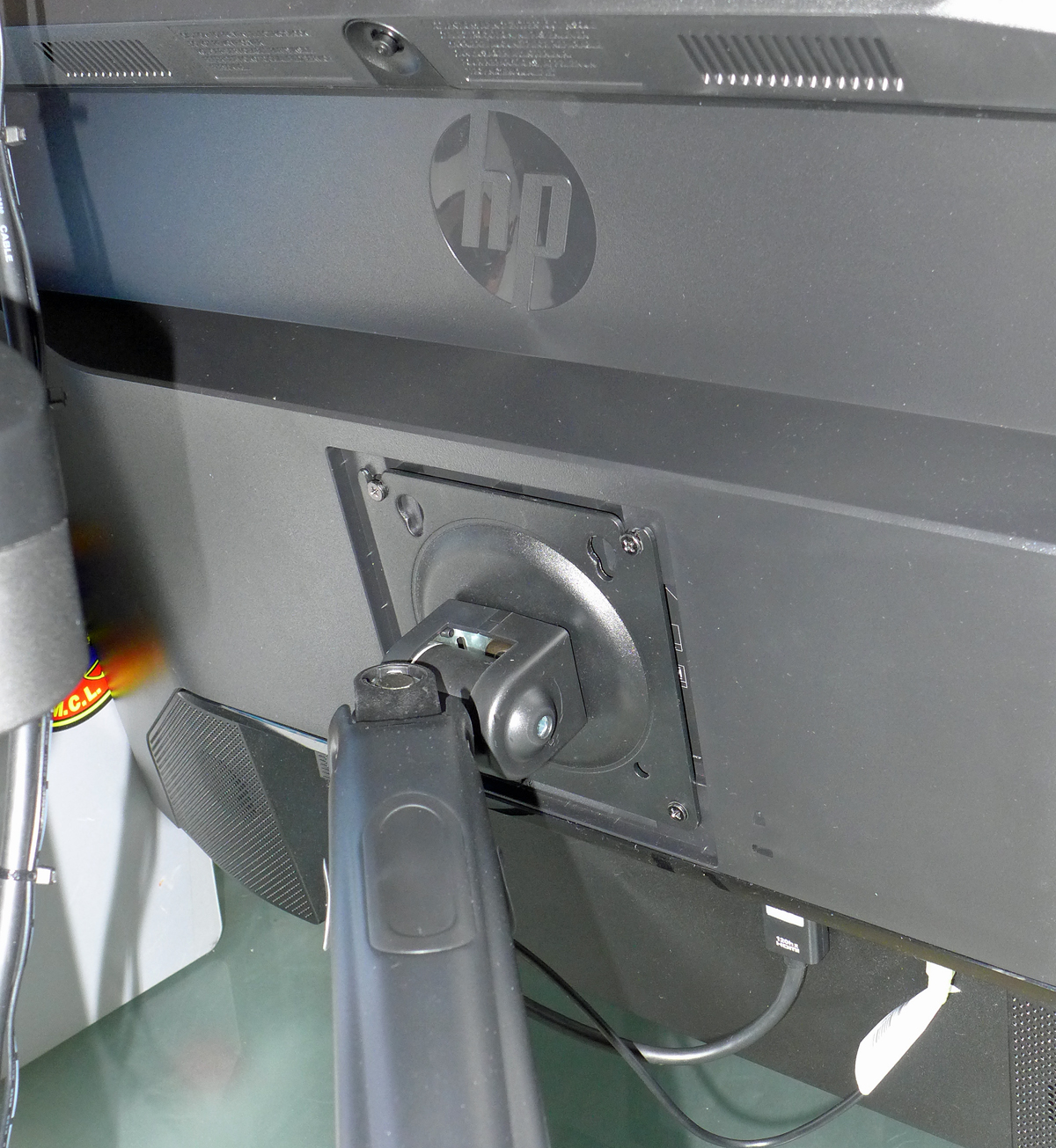
As you already know, this is the HP monitor. Note how the VESA mount is recessed in the back. Also, you can see the speakers. The LG has grille slots for speakers. It just doesn't have them. Also, note how the cables receptacles are all oriented pointing down. Now, if the monitor is mounted, it is a bit tricky to see what goes where. But, in HP's defense, it also allows monitors to be mounted flush to a wall. The LG could not do that for two reasons: The stand mount is not removeable, and the cables plug directly into the back, as you see below. More on the HP's recessed VESA later.
The HUANOU arms, as stated, are gas filled. To adjust the springiness of the arms and how high you want the arm to rise, there is a single ALLEN screw with a clearly seen label which explains which way to turn the screw to achieve your objective. 

The LG's arm is left at the factory setting because I want it all the way up. The HP's arm I had to adjust to get it the the height I wanted. It moves up and down easily, yet stays exactly where I want it to.

That covers the HUANUO Dual Gas Spring Monitor Mount and it's many features. I assure you that if you are at all capable with a couple hand tools (all of which are included!) you too can assemble and deploy the HUANUO Dual Gas Spring Monitor Mount. ONE thing though: I found it easier to mount the arms onto the monitors first. But, they are designed to slide the monitor on the the bracket easily by having the top screw holes slotted.

Finally, the comparison between the LG 27MK600M-B and the HP M27ha FHD monitors. 

The HP has, just like every previous HP monitor, push button switches on the lower right bottom. The furthest to the right is the ON/OFF button. I've already explained my dislike of the LG's joystick. I found no joy in it.

And now, the stands of each brand, below. Starting with the HP, I will show you both stands that come with each monitor.

The HP base is simplicity in itself. All steel construction with plastic where needed. There is a rotational disc beneath the square base, if one needs to rotate it.
The stand is height adjustable, a first for me, and I've been using PCs since 1996. 
Just look at that square top piece. The three fingers slide into corresponding slots on the back of the monitor in the recessed VESA area. One finger is all it takes to remove or install the monitor to the stand. 
I have two photos here to show you, A: the little tab sticking out (above) which is how one removes and attaches the stand to the monitor. See those two angled latches? Just like on a house or office door.
Look at how robust the steel slider is. With the monitor mounted, it stays at the level  you want it to, but also slides up or down easily. Well done HP engineers!
This is the bottom of both stands. See that each has a simple finger screw to attach or remove the upright piece from their respective bases. Also, not the rotating disc aforementioned. See the two steel fingers of the upright portion next to the rotator?

This is the base/stand for the LG 27MK600M-B monitor. While it is stylish and I imagine perfectly stable, I just wonder how easily it could be upset if bumped. 
It too is all steel, just a whole lot less steel than the HP's stand is made off.
This is the way it looks from the front, or what one sees when seated in front of it. Well, one sees most of it. It is NOT height adjustable. It does NOT allow one to set the angle of the screen. No, sir! (Or mam.) WYSIWYG. That's an old acronym: What You See Is What You Get.
When I finished the article originally, I forgot to include these two photos of the screens. Despite them having minimal plastic frames, there still is a black edge on both of them.
I have a desk lamp/magnifying glass and it's head was above the top screen (this one) and thus it's picture appears lighter than it really is.

BOTH monitors, as I have previously stated, are fine monitors. I prefer the HP, but that is me.

I don't know about you, but I like to control things. To make adjustments to suit me. My wife is the same way. We sometimes clash, a little. But, we have yet, in 28 years, to have an actual argument. 

Here are links to more information on the three products I have shown you:


I am NOT in anyway affiliated with HUANOU, HP, LG or Amazon! I am simply someone who likes to share what they have learned with others. This is my 465th article of this blog. That's a lot of sharing!

Thank you SO much for taking the time to read this comparison article. Your comments below, or via Facebook are welcome and encourage me to keep doing what I love.

Scott Robb
October 27, 2022
#456

Fully-Working, 74-Year-Old Soviet-Era Film Camera, Zorki 1-B, Travels from Kyiv, Ukraine To Virginia, USA

  February 3, 2026 #536 Gentle reader, Long time readers know that the largest collection I had was film cameras. In the mid-1990's Nanc...